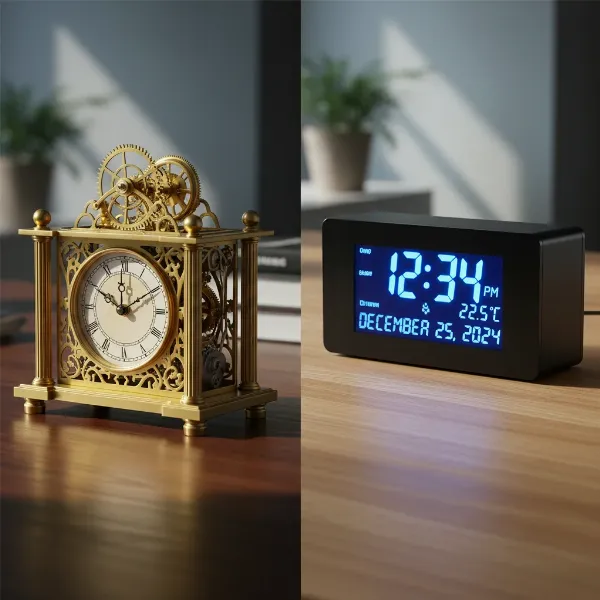
In today’s dynamic work and gaming environments, where multiple monitors often dominate our desks, a simple glance at a phone or system tray might feel disruptive. A well-chosen desk clock, however, offers a focused, elegant, and often multifunctional solution to keep track of time without breaking your workflow. Beyond mere timekeeping, the right desk clock seamlessly integrates into your setup, enhancing aesthetics and providing crucial information at a glance. Whether you’re a professional juggling deadlines across screens or a gamer immersed in virtual worlds, finding a desk clock that complements your multi-monitor arrangement is key to maintaining focus, organization, and a visually cohesive workspace. This guide explores the best options available, ensuring you can select a timepiece that perfectly matches your needs and style.
Popular Desk Clock Types for Modern Workspaces
The world of desk clocks has evolved far beyond traditional ticking mechanisms, now offering a diverse range of options tailored to modern demands. For individuals with multiple monitor setups, the choice often comes down to functionality, display clarity, and how well the clock integrates with a tech-heavy environment.
Digital Clocks: The Modern Timekeepers
Digital desk clocks are the undisputed champions for multi-monitor setups, primarily due to their crisp, easy-to-read displays and often extensive feature sets. These clocks leverage LED or LCD technology to present time in a clear, unambiguous format, often incorporating additional data like date, temperature, and humidity. Many digital models are designed with a sleek, minimalist aesthetic, making them ideal companions for contemporary desks.
- Advantages: Digital clocks typically offer excellent readability from various angles, adjustable brightness settings to suit different lighting conditions, and a silent operation free from distracting ticking sounds. Many come equipped with smart features such as USB charging ports, dual alarms, and automatic daylight saving time (DST) adjustments. Their modern designs often blend seamlessly with tech aesthetics.
- Disadvantages: Some budget digital clocks might have less durable builds or overly bright displays that could be distracting, though many offer dimming options. They are reliant on power, usually AC with battery backup, meaning they might not be as portable as some analog counterparts.
- Functionality and Smart Features: Beyond the basic time and date, advanced digital clocks can offer indoor/outdoor temperature readings, humidity sensors, and even weather forecasts. Smart desk clocks, like the LaMetric Time, can display custom text, pixel art, social media subscriber counts, and integrate with music services like Spotify, transforming them into a true “battlestation” accessory. Some also feature touch-activated backlights for nighttime viewing.
- Recommended Digital Clock Brands: Brands like DreamSky, JALL, Seiko, and Howard Miller offer a range of digital clocks with features like large displays, adjustable brightness, and alarm functions. For smart features and unique displays, options like the Divoom Premium LED Gaming Clock or Adventurer’s IPS Nixie Tube Clock provide distinct aesthetic and functional advantages.
|
Our Picks for the Best Desk clock in 2026
As an Amazon Associate I earn from qualifying purchases.
|
||
| Num | Product | Action |
|---|---|---|
| 1 | Netzu 3-in-1 Digital Clocks for Living Room with Temperature, Date & Time Display - 4 Levels Birghtness, 3 Volumes, Small & Compact Plug-in Alarm Clock for Bedroom, Office (Black) |

|
| 2 | Amazon Basics Small Digital Oval Alarm Clock with LED Display, Nightlight, Snooze Function & Battery Backup, Black, 4.5 x 3.5 x 2.4 Inches |
|
| 3 | Peakeep Slim Digital Mirror Aesthetic Alarm Clock for Bedrooms Desk Decor - Plug in Electric Big LED Modern Small Clock for Office Living Room, Battery Backup, 6 Dimmers (Gold) |
|
| 4 | DreamSky Wooden Digital Alarm Clock for Bedroom - Desk Clock for Living Room with Large Numbers, Dimmer, Loud Alarm for Heavy Sleepers with Volume Control, DST, Office Wood Decor (Plug in Clock) |
|
| 5 | Peakeep Large Display Digital Alarm Clock for Bedrooms, Date Day of Week Calendar Desk Table Clocks for Living Room Office, Dimmable Plug in Electric Clock, 5 Volumes, Loud, Auto DST |
|
| 6 | AYRELY® 4.5" Analog Alarm Clock,Small Retro Desk Clock Battery Operated,Slient Metal Table Clock with Light for Living Room Decor,Bedroom,Bedside,Shelf (Blue) |
|
| 7 | AYRELY® 4.5" Analog Alarm Clock,Small Retro Desk Clock Battery Operated,Slient Metal Table Clock with Light for Living Room Decor,Bedroom,Bedside,Shelf (Orange-Yellow) |
|
| 8 | DreamSky Digital Alarm Clocks for Bedrooms - Wooden Desk Clock with Date, Day of Week, USB Port, Temperature, Dimmer for Bedside Table, Living Room, Office, Adjustable Volume, Auto DST, Wood Decor |
|
| 9 | Sharp Digital Alarm Clock with Keyboard Style Controls, Battery Back-up, Easy to Use with Simple Operation, Black Case with Red LED Display |
|
| 10 | Clock with Day and Date for Elderly, 7" Large Display Digital Calendar Day Clock with 20 Custom Alarms and Medicine Reminders, Dimmable Dementia Alzheimers Clocks for Seniors, Black (Ac Powered) |
|
[image-1|digital-desk-clock-multi-monitor|A sleek, modern digital desk clock with a clear LED display showing time, date, and temperature, positioned next to multiple computer monitors.|
A modern, minimalist digital desk clock with a large, glowing LED display showing “10:30 AM”, “MAR 27”, and “72°F”. The clock is black with white or amber digits, placed on a clean wooden desk surface next to a setup with two large, dark computer monitors displaying code or a dashboard. The scene is well-lit from the front, showcasing the clock’s readability and seamless integration. Studio photography style.]
Mechanical Clocks: Timeless Elegance
While digital clocks dominate the modern tech landscape, mechanical desk clocks offer a timeless appeal. These clocks operate using gears, springs, and balances, often showcasing intricate craftsmanship. They can range from classic analog designs to retro flip clocks, adding a touch of vintage charm or sophisticated minimalism to a desk.
- Advantages: Mechanical clocks, particularly analog ones, can be incredibly elegant and act as statement pieces. They offer a tangible connection to timekeeping history, and some, like retro flip clocks, provide a unique visual experience as the numbers change. They don’t rely on electricity (unless battery-operated quartz), making them independent of power outlets.
- Disadvantages: Many mechanical clocks produce an audible ticking sound, which can be a distraction in a quiet multi-monitor setup. Their displays are less customizable and often harder to read quickly compared to digital counterparts. They typically lack the smart features and additional information displays of modern digital clocks. Maintenance for true mechanical clocks can also be more involved.
- How They Work and Maintenance: Traditional mechanical clocks rely on a mainspring that stores energy, which is then released gradually through a gear train to move the hands. Quartz mechanical clocks use a battery-powered quartz crystal to regulate time, offering greater accuracy with minimal maintenance. Cleaning and occasional servicing by a professional might be required for intricate mechanical movements.
- Notable Mechanical Clock Brands: While the search results didn’t focus heavily on high-end mechanical desk clocks, brands offering classic analog styles include Braun and various Etsy artisans creating unique, handcrafted pieces, including retro flip clocks.
Alarm Clocks: Essential Functionality
Most desk clocks, whether digital or mechanical (though less common), incorporate alarm functionalities. For multi-monitor users, an alarm clock on the desk provides a dedicated way to set reminders for breaks, meetings, or switching tasks, preventing the need to constantly check other devices.
- Advantages: A dedicated desk alarm clock ensures you don’t miss important events, especially if your phone is on silent or out of reach. Many digital alarm clocks offer multiple alarm settings, snooze functions, and adjustable volume levels. Some even feature gentle wake-up lights.
- Disadvantages: For those who prefer minimalist setups, an alarm clock might add unnecessary clutter if basic timekeeping is the only requirement. Some alarm sounds can be jarring.
- Types of Alarm Tones: Digital alarm clocks often provide a range of beeping sounds, from gentle to insistent. Some advanced models offer nature sounds, white noise, or even Bluetooth speaker functionality to play music as an alarm. Retro-style alarm clocks might feature twin bells for a classic, loud ringing.
- Choosing the Right Alarm Clock: Consider the volume and type of alarm sound, the ease of setting and snoozing, and whether you need multiple alarms. For a multi-monitor setup, an alarm clock with a clear display that’s easy to reach and operate without disturbing your main screens is ideal.
Your Guide to Purchasing the Perfect Desk Clock
Selecting the ideal desk clock for a multi-monitor setup goes beyond just telling time; it’s about integrating functionality and aesthetics seamlessly into your personal workspace. This guide helps you navigate the options to make an informed decision.
Determining Your Usage Needs
Before diving into features, consider what you truly need from a desk clock, especially with a busy multi-monitor environment.
- Purpose: Are you primarily looking for a simple time display, or do you need additional information like date, temperature, or even weather updates? For busy professionals, a clock that displays calendar events or meeting reminders can be invaluable. Gamers might appreciate integration with streaming platforms or custom display options.
- Placement and Size: Evaluate the available space on your desk. With multiple monitors, real estate is often at a premium. Look for compact, slim designs that won’t obstruct screen views or clutter the desk. Consider if you prefer a clock that sits discreetly or one that makes a visual statement. Some clocks can even be wall-mounted, freeing up desk space entirely.
- Budget: Desk clocks range widely in price, from under $20 to hundreds for feature-rich or artisanal models. Determine a realistic budget that balances desired features with affordability.
Choosing the Right Clock Type
Once your needs are clear, selecting the appropriate type of clock becomes easier.
- Aesthetics: Your desk clock should complement your existing setup. If your multi-monitor station features sleek, minimalist designs, a digital clock with clean lines, or a sophisticated wooden LED clock, would be an excellent match. For a more retro or industrial vibe, a Nixie tube-inspired clock or a mechanical flip clock could add character. “A desk clock is also part of your office décor. If your home office has a modern setup with clean lines, a minimalist clock with a simple dial and sleek frame may be the best match.”
- Material: Materials like wood, metal, glass, or plastic each offer a different look and feel. Wooden clocks can add warmth, while metal or glass provide a modern, sleek touch. Consider durability and how the material integrates with your desk’s surface and monitor bezels.
- Features:
- Display Clarity: Look for large, easy-to-read digits or words, especially if you’re frequently shifting focus between monitors. Adjustable brightness is crucial to prevent the clock from being too distracting or too dim.
- Connectivity and Power: USB charging ports are a huge plus for powering small devices or keeping your phone topped up. Most digital clocks require an AC power source, often with a battery backup for settings retention during outages.
- Smart Functions: If you want more than just time, explore smart clocks that offer weather reports, custom notifications, app integrations (e.g., for Spotify or social media metrics), or even customizable pixel art displays.
Comparing Prices and Making a Purchase
With a clear idea of your preferred clock type and features, it’s time to find the best deal.
- Reputable Retailers: Purchase from well-known electronics stores, office supply retailers, or reputable online marketplaces. For unique or artisanal clocks, specialty decor shops or platforms like Etsy can offer distinctive options.
- Price Comparison: Use online tools to compare prices across different vendors. Be aware that prices can vary significantly depending on features, brand reputation, and materials.
- Customer Reviews: Always check customer reviews for insights into real-world performance, durability, and any potential quirks. Pay attention to comments regarding display brightness, alarm functionality, and ease of setup.
- Warranty and Returns: Ensure the retailer offers a reasonable warranty and return policy, especially for higher-priced models, to protect your investment.
Comparison Table of Popular Desk Clock Features
To aid in your decision, here’s a comparison of features commonly found in desk clocks suitable for multi-monitor setups.
| Feature Category | Digital/Smart Clocks | Mechanical/Analog Clocks |
|---|---|---|
| Display | LED/LCD, large digits, adjustable brightness, often multi-info (date, temp) | Analog hands, sometimes numbers; retro flip digits |
| Aesthetics | Modern, minimalist, tech-integrated; some unique (Nixie tube, pixel art) | Classic, vintage, rustic, elegant |
| Functionality | Alarms, USB charging, smart features (weather, apps, custom text), DST auto-adjust | Basic time; alarms in some models |
| Sound | Silent operation; beeping alarms | Audible ticking (often); mechanical alarm bells |
| Power | AC adapter (primary), battery backup | Battery (quartz) or winding (true mechanical) |
| Maintenance | Low; occasional battery replacement | Low (quartz); professional service (true mechanical) |
| Cost Range | Low to high (depending on smart features) | Low to moderate |
Essential Tips for Using and Maintaining Your Desk Clock
Proper care ensures your desk clock remains a reliable and stylish fixture in your multi-monitor setup for years to come.
Cleaning Your Desk Clock Correctly
Keeping your clock clean is crucial for maintaining its appearance and functionality.
- Digital Displays: Gently wipe LED or LCD screens with a soft, microfiber cloth. For smudges, slightly dampen the cloth with water or a screen cleaner, then wipe dry. Avoid abrasive cleaners, which can damage the display.
- Casing: For plastic or metal casings, use a soft, damp cloth. A mild soap solution can be used for stubborn marks, followed by a dry wipe. For wooden clocks, use a wood-specific cleaner or a slightly damp cloth, then polish with a dry, soft cloth.
- Mechanical Clocks: For analog faces, use a soft, dry brush to remove dust. Avoid touching the hands directly. If the clock has a glass or acrylic cover, clean it as you would a digital display. For intricate mechanical parts, professional cleaning is recommended.
Storing Your Desk Clock When Not in Use
If you need to store your desk clock, especially during a move or if you’re rotating decor, follow these guidelines.
- Avoid Direct Sunlight: Prolonged exposure to direct sunlight can fade colors, warp materials, and damage internal components, particularly in digital clocks.
- Steer Clear of Humidity: High humidity can lead to corrosion in mechanical parts and electronic circuits. Store your clock in a dry environment.
- Safe and Stable Location: Place the clock in a sturdy box, ideally in its original packaging if available, or wrapped in a soft cloth to prevent scratches and impacts. Ensure it’s in a location where it won’t be easily knocked over or subjected to extreme temperatures. If battery-powered, remove the batteries to prevent leakage.
Conclusion
Choosing the best desk clock for your multiple monitor setup is a personal decision that balances practical needs with aesthetic preferences. Digital and smart clocks often provide the most utility, offering clear displays, additional information, and modern features like USB charging and app integrations that perfectly complement a tech-centric workspace. While mechanical clocks offer classic charm, the immediate readability and functionality of digital models usually make them a superior choice for busy professionals and gamers. By considering your specific requirements for display, features, and design, you can find a desk clock that not only keeps you punctual but also elevates the overall look and efficiency of your multi-monitor environment.
What features do you prioritize most in a desk clock for your ultimate productivity hub?
Frequently Asked Questions
What is the most important feature for a desk clock in a multi-monitor setup?
The most important feature is often a large, clear, and easily readable display with adjustable brightness. This ensures you can quickly check the time or other information without straining your eyes or interrupting your focus on your main screens.
Can a desk clock help reduce screen time?
Yes, a dedicated desk clock can help reduce screen time by providing time, date, and sometimes other information at a glance, minimizing the need to switch to your phone or open another application on your computer. This helps maintain focus and reduce distractions.
Are there desk clocks that integrate with smart home systems?
Yes, some advanced smart desk clocks, like the LaMetric Time, offer integrations with various smart home platforms and apps, allowing them to display notifications, control smart devices, or show information from other services directly on their screens.
What’s the best type of desk clock for a minimalist desk setup?
For a minimalist setup, a sleek, digital LED clock with clean lines and a compact form factor is often ideal. Wooden cube clocks or simple analog designs with a monochrome palette can also blend seamlessly into a clutter-free aesthetic.
How do I ensure my desk clock’s display isn’t too bright at night?
Many digital desk clocks feature adjustable brightness settings, including automatic dimming based on ambient light or manual controls. Look for models with multiple brightness levels or a dedicated “night mode” to prevent the display from being overly bright after hours.