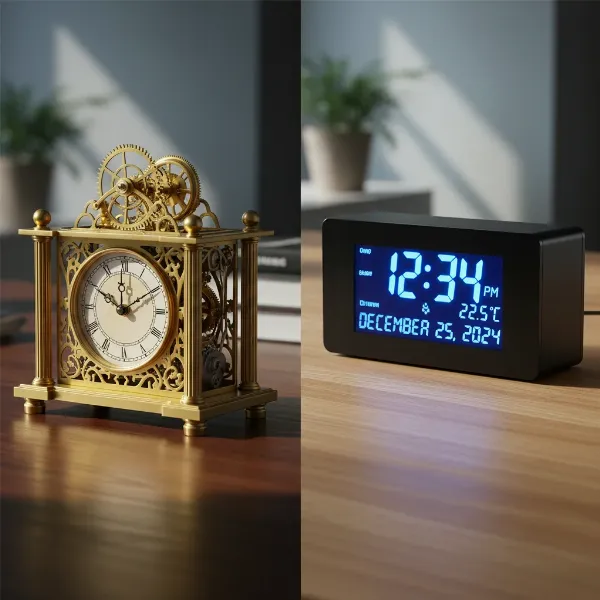
A desk clock is more than just a simple time-telling device; it’s a statement of style, a functional tool for productivity, and often a piece that adds character to your personal or professional space. Whether you’re aiming for a sleek, modern aesthetic, a touch of vintage charm, or a highly functional gadget, the world of desk clocks offers an impressive array of choices. Navigating these options to find the perfect timepiece for your needs can be a delightful journey, helping you discover a clock that not only keeps you punctual but also enhances your daily environment. This guide will walk you through the various types of desk clocks, offer essential buying advice, present a comparison of popular models, and provide practical tips for their care and maintenance.
Popular Desk Clock Types
Desk clocks come in various designs and mechanisms, each offering unique advantages and aesthetics. Understanding these differences is key to selecting a clock that aligns with your preferences and lifestyle.
Mechanical Clocks
Mechanical clocks are a testament to traditional horology, operating through an intricate system of gears, springs, and sometimes pendulums. They typically require manual winding to maintain accurate time.
- Pros and Cons: The primary advantage of a mechanical desk clock lies in its craftsmanship and the nostalgic appeal of its visible inner workings. Many enthusiasts appreciate the smooth, continuous sweep of the second hand and the absence of batteries. However, they often require more diligent maintenance, including regular winding and periodic professional oiling and cleaning. They can also be more susceptible to environmental factors like dust and humidity.
- How They Work and Maintain: A mechanical clock stores energy in a mainspring, which gradually unwinds, releasing power to a series of gears that move the hands. Maintenance involves consistent winding, ideally at the same time each day or week, ensuring the spring doesn’t experience undue strain. Avoid overwinding, stopping when you feel resistance. Professional servicing every 2-3 years for oiling and 5-10 years for thorough cleaning is recommended to ensure longevity.
- Notable Mechanical Brands: While some luxury brands like Chopard and Jaeger-LeCoultre offer exquisite mechanical desk clocks, more accessible options exist from manufacturers like Hermle, known for their traditional and skeleton wind-up mantel clocks. These often become heirloom pieces due to their durable construction and timeless design.
|
Our Picks for the Best Desk clock in 2026
As an Amazon Associate I earn from qualifying purchases.
|
||
| Num | Product | Action |
|---|---|---|
| 1 | AYRELY® 4.5" Analog Alarm Clock,Small Retro Desk Clock Battery Operated,Slient Metal Table Clock with Light for Living Room Decor,Bedroom,Bedside,Shelf (Blue) |

|
| 2 | DreamSky Digital Alarm Clocks for Bedrooms - Wooden Desk Clock with Date, Day of Week, USB Port, Temperature, Dimmer for Bedside Table, Living Room, Office, Adjustable Volume, Auto DST, Wood Decor |
|
| 3 | Sharp Digital Alarm Clock with Keyboard Style Controls, Battery Back-up, Easy to Use with Simple Operation, Black Case with Red LED Display |
|
| 4 | AYRELY® 4.5" Analog Alarm Clock,Small Retro Desk Clock Battery Operated,Slient Metal Table Clock with Light for Living Room Decor,Bedroom,Bedside,Shelf (Orange-Yellow) |
|
| 5 | Clock with Day and Date for Elderly, 7" Large Display Digital Calendar Day Clock with 20 Custom Alarms and Medicine Reminders, Dimmable Dementia Alzheimers Clocks for Seniors, Black (Ac Powered) |
|
| 6 | Amazon Basics Small Digital Oval Alarm Clock with LED Display, Nightlight, Snooze Function & Battery Backup, Black, 4.5 x 3.5 x 2.4 Inches |
|
| 7 | Netzu 3-in-1 Digital Clocks for Living Room with Temperature, Date & Time Display - 4 Levels Birghtness, 3 Volumes, Small & Compact Plug-in Alarm Clock for Bedroom, Office (Black) |
|
| 8 | Peakeep Large Display Digital Alarm Clock for Bedrooms, Date Day of Week Calendar Desk Table Clocks for Living Room Office, Dimmable Plug in Electric Clock, 5 Volumes, Loud, Auto DST |
|
| 9 | Peakeep Slim Digital Mirror Aesthetic Alarm Clock for Bedrooms Desk Decor - Plug in Electric Big LED Modern Small Clock for Office Living Room, Battery Backup, 6 Dimmers (Gold) |
|
| 10 | DreamSky Wooden Digital Alarm Clock for Bedroom - Desk Clock for Living Room with Large Numbers, Dimmer, Loud Alarm for Heavy Sleepers with Volume Control, DST, Office Wood Decor (Plug in Clock) |
|
Digital Clocks
Digital desk clocks leverage electronic signals and displays to show time, often in a 12- or 24-hour format. They are known for their precision and a host of additional features.
- Pros and Cons: Digital clocks excel in readability, especially with large LED or LCD displays and adjustable brightness settings. Many come packed with smart features like alarms, date and temperature displays, USB charging ports, and even wireless charging. They require minimal maintenance, usually just battery changes or a consistent power source. The downside might be a less traditional aesthetic, and some users find the bright displays disruptive in dark environments, though many offer dimmer functions.
- Smart Features: Modern digital desk clocks often include multiple alarm settings, snooze functions, indoor temperature and humidity monitoring, and calendar displays showing the day, date, and month. Some integrate Qi wireless charging pads to reduce desk clutter, allowing you to charge compatible smartphones by simply placing them on the clock’s base. Others can display time in words rather than numbers for a unique touch.
- Popular Digital Brands: Brands like JALL, MOSITO, and DreamSky are prominent in the digital desk clock market, offering a range of styles from minimalist wooden blocks to compact, feature-rich devices. AcuRite is recognized for clocks with large, easy-to-read displays.
Alarm Clocks
While many digital and some mechanical clocks incorporate alarm functions, dedicated alarm clocks often prioritize waking capabilities with diverse sound options and reliability.
- Pros and Cons: The primary benefit of an alarm clock is its dedicated function to rouse you at a specific time, often with robust alarm volumes and snooze features. Some offer gentle, gradually increasing alarm sounds or a variety of tones. The main disadvantage can be limited additional features compared to more versatile digital clocks, or a simpler aesthetic.
- Types of Alarm Sounds: Alarm clocks can feature traditional beeps, buzzers, radio alarms, or even nature sounds to facilitate a gentler wake-up. Some advanced models offer custom music tracks or gradually increasing light to simulate a sunrise.
- Choosing the Right Alarm Clock: Consider your sleeping habits: heavy sleepers might need louder, more persistent alarms, while light sleepers might prefer softer, more natural sounds. Look for features like adjustable volume, easy-to-find snooze buttons, and a battery backup for digital models to ensure the alarm functions even during power outages. For example, the JALL Circular Analog Alarm Clock provides a silent sweep hand and a night light, ideal for bedrooms without disruptive ticking.
Desk Clock Buying Guide
Selecting the ideal desk clock involves more than just picking one that looks good. Thoughtful consideration of your needs, the clock’s features, and where you’ll purchase it will ensure lasting satisfaction.
Determine Usage Needs
Before diving into styles and features, consider how and where your desk clock will be used.
- Purpose: Are you primarily looking for a simple time display, or do you need additional functionalities like an alarm, date, temperature, or a charging station? For focused work, a clock with a countdown timer can be invaluable for productivity methods like Pomodoro. If it’s purely decorative, aesthetic considerations will take precedence.
- Placement: The location of your clock will influence its size, visibility, and power source. A clock for a small home office might need to be compact, while a larger, more elaborate piece could suit a spacious executive desk or living room. Consider viewing distance and potential glare from windows or lamps.
- Budget: Desk clocks range from affordable, feature-packed digital models to luxury mechanical pieces costing thousands. Define a budget early to narrow down your options. Entry-level digital clocks can start around $20-$50, while high-end analog or mechanical clocks can run into the hundreds or even thousands.
Choose a Suitable Clock Type
With your needs in mind, you can now consider the specific characteristics that define a desk clock’s appearance and functionality.
- Style: Desk clocks are available in an extensive range of styles. Modern and minimalist designs often feature clean lines, geometric shapes, and materials like steel, glass, or polished metals. Retro flip clocks offer a nostalgic mechanical display, while vintage or antique styles might have ornate details and classic wood finishes. Consider whether the clock will complement or contrast with your existing decor.
- Material: Common materials include wood (for a warm, classic, or rustic look), metal (for sleekness or industrial appeal), glass (for elegance and transparency), and plastic (often found in more budget-friendly digital models). The material impacts both the clock’s durability and its aesthetic.
- Features: Beyond basic time, evaluate desired features:
- Display: Analog (hands and dial) or Digital (LED/LCD numbers).
- Illumination: Backlight, night light, or adjustable brightness for visibility in varying light conditions.
- Connectivity: USB charging ports, wireless charging, or radio-controlled atomic time setting.
- Sensors: Temperature, humidity, or date displays.
- Alarms: Single, dual, or multiple alarms with snooze functions and diverse sound options.
Compare Prices and Purchase
Once you have a clear idea of what you need, it’s time to find the best value.
- Reputable Stores: Purchase from established retailers, dedicated clock shops, or well-known online marketplaces with good return policies. This ensures product authenticity and customer support.
- Price Comparison: Use online tools and visit multiple stores to compare prices for your preferred models. Be wary of deals that seem too good to be true, especially for higher-end pieces.
- Product Quality Check: Read reviews to gauge product reliability and customer satisfaction. If possible, inspect the clock in person for material quality, finish, and the smooth operation of hands or display. For mechanical clocks, listen for consistent movement and check the winding mechanism.
Comparison Table of Popular Desk Clocks
| Brand/Model | Type | Key Advantages | Key Disadvantages | Price Range (Estimated) |
|---|---|---|---|---|
| MOSITO Digital Wooden | Digital | Modern design, adjustable dimmer, temperature, dual alarms. | Requires AC power (battery for backup only), plastic build. | $20 – $40 |
| JALL Circular Analog Alarm | Analog | Silent movement, night light, classic aesthetic, battery-powered. | Basic features, single alarm, less suitable for office. | $15 – $30 |
| DreamSky Compact Digital | Digital | Easy-to-read, compact, dimmable screen, USB charging. | Simple black design may not suit all decors, limited smart features. | $25 – $50 |
| Howard Miller Kensington Table | Analog | Elegant glass and metal design, Roman numerals, quiet quartz movement. | No smart features, requires AA battery, higher price point for basic functionality. | $60 – $120 |
| Chopard Classic Racing | Mechanical | Luxury craftsmanship, unique dashboard design, thermometer, hygrometer. | Very high price, manual winding may be needed, specific aesthetic. | $2,000+ |
Tips for Using and Maintaining Your Desk Clock
Proper care ensures your desk clock remains a reliable and beautiful part of your space for years to come. From routine cleaning to mindful placement, these tips will help preserve its functionality and aesthetic appeal.
Proper Clock Cleaning
Regular cleaning is vital, but the method depends on the clock’s materials. Always use soft, lint-free cloths and avoid harsh chemicals.
- Basic Cleaning Steps:
- Dusting: Gently wipe away surface dust with a soft, dry microfiber cloth or a feather duster. For intricate designs, a soft brush can be helpful.
- Glass Surfaces: For glass covers, spray a non-ammonia glass cleaner onto a soft cloth first, then gently wipe the glass. Never spray cleaner directly onto the clock face to prevent liquid from seeping into the mechanism or causing cloudy marks.
- Metal Components (e.g., Brass): Brass parts should be cleaned with a soft cotton cloth and a mild cleaner specifically designed for brass, or simply warm soapy water. Avoid abrasive cleaners or polishes that can damage delicate finishes and wipe away fingerprints, as oils can cause tarnish. For more valuable pieces, consider professional cleaning.
- Wooden Cases: Use a soft cloth to dust. For deeper cleaning, apply a wood cleaner or furniture polish to a cloth, then gently wipe the wooden surfaces. Avoid silicone-based products which can cause buildup.
- Internal Mechanisms: For mechanical clocks, avoid attempting to clean or oil the internal mechanism yourself unless you are a trained professional. Improper handling can cause significant damage. Professional servicing every few years for oiling and a more thorough cleaning every 5-10 years is recommended.
Clock Storage When Not in Use
Where and how you keep your desk clock, especially when not actively used, significantly impacts its longevity.
- Avoid Direct Sunlight: Prolonged exposure to direct sunlight can fade wood finishes, discolor plastic, and warp delicate components. Place your clock in a spot where it’s protected from intense UV rays.
- Steer Clear of Humid Areas: High humidity can lead to rust in mechanical components and encourage mold growth on wooden parts. Avoid placing clocks in bathrooms, kitchens, or damp basements. Conversely, excessively dry environments can also damage wood. A stable temperature and moderate humidity are ideal.
- Safe and Stable Placement: Ensure your desk clock rests on a flat, stable surface to prevent accidental falls, especially for heavier or more delicate models. If it’s a mechanical clock with a pendulum, ensure the pendulum is secured or removed before moving the clock to prevent damage. When storing, consider a protective cover to shield it from dust and potential impacts. Change batteries in battery-powered clocks at least twice a year to prevent leakage that can damage the internal components.
Frequently Asked Questions
What’s the difference between analog and digital desk clocks?
Analog desk clocks display time using hands that point to numerals or markers on a dial, typically representing 12 hours. Digital desk clocks show time using numbers directly on an electronic screen, often with a 12- or 24-hour format, and may include additional features like date or temperature displays.
Can I set multiple alarms on a digital desk clock?
Many modern digital desk clocks offer the capability to set multiple alarms, allowing you to program different wake-up times for weekdays, weekends, or specific events. Some even offer distinct alarm tones or volumes for each setting, providing greater flexibility.
How do I ensure my mechanical desk clock keeps accurate time?
To maintain accuracy, a mechanical desk clock requires regular winding, usually at the same time each day or week, depending on its power reserve. Additionally, professional oiling every two years and a thorough cleaning every five to ten years by a qualified clockmaker are crucial for optimal performance and longevity.
What features should I look for in a desk clock for productivity?
For productivity, consider a desk clock with features like a built-in countdown timer for focused work sessions (e.g., Pomodoro technique), a clear calendar display for quick date checks, and possibly temperature monitoring for environmental comfort. Wireless charging can also minimize desk clutter and distractions.
Are desk clocks battery-operated or do they need to be plugged in?
Desk clocks can be either battery-operated, requiring AA or similar batteries, or powered by an AC adapter, plugging into a wall outlet. Many digital clocks are plug-in with a small internal battery backup to retain settings during power outages, while most analog clocks are typically battery-powered.
How do I read the time on a desk clock in a dark room?
Many desk clocks, especially digital models, offer features for low-light visibility, such as backlights, adjustable dimmers, or night light functions. Some analog clocks have luminous hands or dials that glow in the dark. For clocks without these, a quick tap might activate a temporary light.
What’s a silent sweep second hand, and why is it desirable?
A silent sweep second hand moves continuously and smoothly around the dial, rather than ticking audibly with discrete jumps. This feature is particularly desirable for desk clocks in bedrooms or quiet offices, as it eliminates distracting ticking sounds, contributing to a more peaceful environment.